Game PackageGame PackageGAME PACKAGE™
SubscriptionsLeaderboardAssets
Game PackageGame PackageGame Package

Unity assets, ready-made projects, and subscriptions in one storefront.

Explore

  • Subscriptions
  • Leaderboard
  • Assets
  • Ready-made
  • Search
© 2026 Game Package. All rights reserved.gamepackage.net
Opening asset
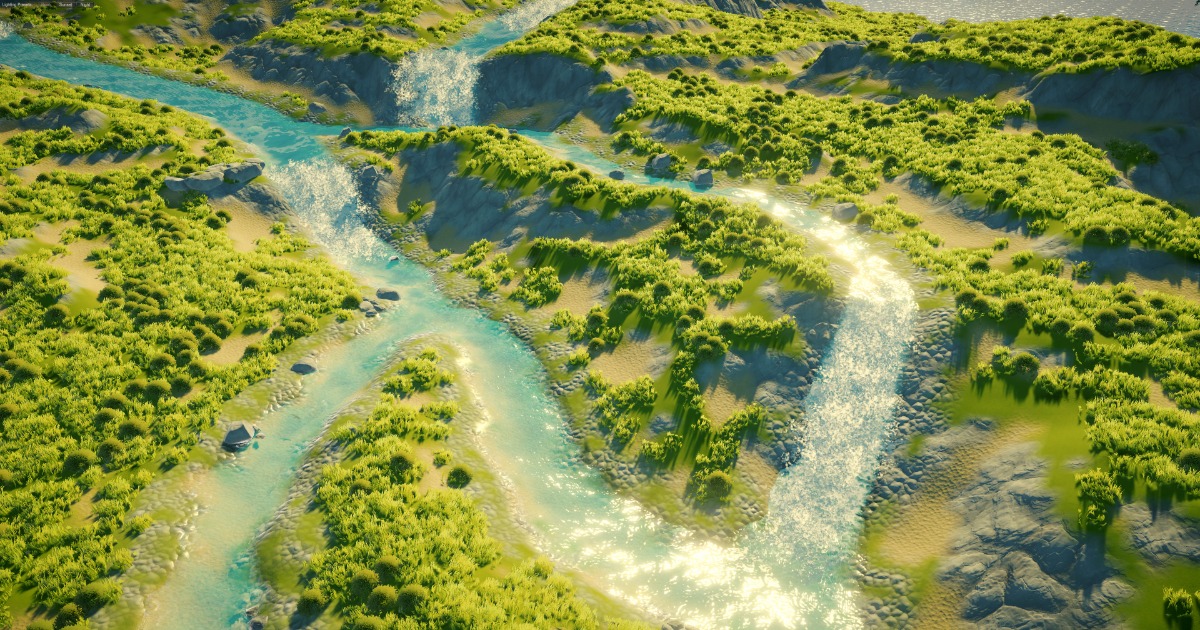
River Modeler for Stylized Water 3 (Extension)

By Staggart Creations

River Modeler for Stylized Water 3 (Extension)

Get the River Modeler for Stylized Water 3 (Extension) package from Staggart Creations and speed up your game development process.

Likes

5

Updated

09/20/2026

Main version

v1.0.0

Add version

Published

Sep 20, 2026

Category channels

level designTools

Available builds

v1.0.0

Asset description

Get the River Modeler for Stylized Water 3 (Extension) package from Staggart Creations and speed up your game development process.

Package overview

River Modeler for Stylized Water 3 (Extension) by Staggart Creations is a Unity asset listed on Game Package. Its catalog categories are level design, Tools.

Requirements and compatibility

No render pipeline compatibility is specified for the published builds on this page.

Check the package description and the original listing for minimum editor versions, dependencies and import instructions before adding the asset to an existing project. View the Unity Asset Store listing.

Versions on Game Package

The current version listed here is 1.0.0.

  • v1.0.0
River Modeler for Stylized Water 3 (Extension)

River Modeler for Stylized Water 3 (Extension)

v1.0.000123456789

09/20/2026

Price

70pts
Sign in
Open inUnity Store

More assets by Staggart Creations

  • Spline Mesher | Standard

    By Staggart Creations

    Version 1.4.1

    📄 Documentation | 🟣 Discord | 💬 Forum thread 🎁 20% discount for Spline Spawner users. A straightforward and powerful tool for spline-based mesh curving. Essential for 3D world building. Built around Unity's native spline tool, making it intuitive to combine with other tools or gameplay logic. > Provide the component with a spline and an input mesh , and it gets continuously repeated and deformed along its curve. This tool makes it easy to achieve this right inside Unity, without needing to go back and forth between editor and external modeling software. Includes advanced features like vertex color control (for shaders), prefab end caps, snapping to ground, and multi-material support - all in a clean, intuitive interface. Build fences, pipes, paths, cables and much more! 📢 Get preview access to the upcoming Spline Extensions asset, the ultimate spline toolkit! Verify your invoice on Discord to join the beta 🔗 Usage Features • Creates one continuous object, no clutter of GameObjects • Automatic box-shape collider generation • Downward snapping/conforming to colliders • UV scale & offset control • Start & end prefab attachments • Rotation roll angle with per-point adjustments, twist a mesh around the spline • Vertex color data over the spline, to drive shader-based effects 🔗 Technical Features • Per-point Scale, Roll and Vertex Color controls • Recalculated normals, ensuring correct lighting and shading • Rebuild events exposed in the inspector, and through C# (run custom code when the mesh updates) • Lightmap UV generation Features a cleanly designed inspector UI, with tooltips and undo/redo support. Public C# functions are commented. ✔️ Supports • Runtime generation - just modify the spline, no extra code besides yours! • Multiple materials (aka sub-meshes) • Multiple splines within the same container • Negative scaling (eg. guardrails mirrored on either side of a track) • Baked lighting, including through Bakery 🚧 Limitations: • Usage of created meshes in prefabs requires exporting them to an FBX file using the Unity's "FBX Exporter" package. Because Unity strictly saves procedural meshes in the scene file. • Constant regeneration of complex geometry every frame may be prone to performance issues (ie. animating splines) • Does not support non-uniformly scaled spline containers • Support for multiple materials is limited to a single spline. ————————————— 🔶 Standard Edition ————————————— Originally released in 2024 , this edition has been continuingly updated and improved through complementary updates. It is now feature-complete and production-proven. The Standard Edition remains fully supported and continues to receive compatibility and stability updates. It is mature, stable, and works as advertised. For next-generation features, advanced performance, and ongoing feature development, Spline Mesher Pro is available separately. Existing users can upgrade at a discount (migration tool included). An upgrade discount of 40% is available until September 1st 2026, for Spline Mesher Pro . ————————————————————————————————————— 🎁 See also the Spline Spawner asset, a 20% discount is available if you own a Spline Mesher license.

    • modeling
    • Tools
  • Spline Spawner | Advanced Object Distribution

    By Staggart Creations

    Version 1.2.2

    « Requires Unity 2022.3 or newer . Supports Unity 6 LTS » 📄 Documentation | 🟣 Discord | 💬 Forum thread 🎁 20% discount is available to Spline Mesher Standard and Pro users. 🔸Effortlessly place objects along or inside Unity Splines , with full creative control over positioning, rotation, and scale. 🔸Use the flexible stack-based modifier system, where each step builds on the last. 🔸Line, area or terrain layer masking for ultimate control. ✅ NEW! Terrain layer masking support (free update!) 💪 You will be able to: Place streetlights, utility poles, or signs along roads and pathways Build fences, railings, and barriers following curves Scatter rocks, debris, or ruins across a zone or area Position checkpoints, race gates, or waypoints for driving or flying games Spawn your visual effects like fog patches, fireflies, or magic zones Generate procedurally placed NPCs, enemies, or creatures along paths 🚀 And so much more! Your creativity is the limit! This tool makes for a pivotal companion in the creation of environments, structures or certain gameplay logic. Expertly crafted for professionals - easy to use by anyone. 🌟 Core Features • Distribution along the spline curve, on knots or in lanes. • Spawning within a spline's flat area ° Uniform distribution without overlaps and minimal empty space ° Radial distribution in rings ° Grid-based in rows & columns • Innovative stack-based modifier system • Deleting or restricting objects with other splines (masking) • Restricting or masking objects based on terrain layers • Random selection of input prefabs using a probability % ⚡Jobs/Burst and GPU accellerated, responsive and lightning fast realtime changes 📑 Modifiers: • Offset (uniform, by noise and randomly) • Rotate • Scale (uniformly, separate axis and randomly) • Snap to Collider • Snap to Grid (X/Y/Z) • Cull • Curvature Filter (limit to curved or straight sections) • Height Filter • Look At • Custom 🔃 Modifiers can be reordered at will, making any specific flow of operations possible. ✅ Supports • Runtime spawning, just modify the spline, no extra code besides yours! • Multiple splines within the same container 🚧 Limitations: • Spawned objects cannot remove objects from other spawners (occupancy system). • Not completely suitable for 2D level design (assumed XZ axis in some calculations) ❓ How is this different from Spline Mesher? This tool places existing prefabs along splines, it does not generate curved meshes from splines. 🎁 A limited time 20% discount is available for Spline Mesher Standard and Pro after purchasing this asset. 📢 Get access to the preview Spline Extensions asset! The ultimate spline toolkit. Verify your invoice on Discord to join the beta.

    • level design
    • Tools
  • Stylized Water 3

    By Staggart Creations

    Version 3.3.4

    Add depth to your next project with Stylized Water 3 from Staggart Creations. Find this & more VFX Shaders on the Unity Asset Store.

    • shaders
    • VFX
  • Fantasy Adventure Environment

    By Staggart Creations

    Version 1.5.7

    • 3D
    • environments
    • fantasy
  • Spline Mesher | Pro

    By Staggart Creations

    Version 1.0.17

    « Requires Unity 2022.3 or newer . Supports Unity 6 » 📄 Documentation | 🟣 Discord | 💬 Forum thread 🎁 20% discount for Spline Spawner users. ⭐️ Pro features • Multithreaded mesh generation. ∟ Realtime changes within milliseconds, up to 50x faster! • Spline fill mesh generation ∟ Build lakes, curbs, islands, platforms and more. • Output mesh splits up into segments ∟ Optimal culling & rendering performance at large scales. • Procedural meshes as input or collider ∟ Configurable Cube, Cylinder or Plane input mesh. • MeshLOD support ∟ Generate LODs in the editor (Unity 6.2+) • Expanded collider functionality ∟ Convex and Kinematic collider support + collision/trigger events For a complete overview see the comparison table . 👍 A migration wizard is included to convert Spline Mesher Standard instances & prefabs. ❓What is Spline Mesher? A straightforward and powerful toolkit for spline-based mesh curving and generation. Essential for 3D world building. Built around Unity's native spline tool , making it intuitive to combine with other tools or gameplay logic. Designed for professionals; easy to use by anyone. 💠 Provide the Curve Mesher component with a spline and an input mesh , and it gets continuously repeated and deformed along its curves. 💠 Use the Fill Mesher component to create a mesh from a spline's contour with a uniform topology and distance field baked right into the UV. 🪄 This tool makes it easy to achieve these complex tasks right inside Unity, without needing to go back and forth between editor and external modeling software. Includes advanced features like vertex color control (for shaders), prefab end caps, snapping to colliders, and multi-material support. All in a clean, intuitive interface. Build fences, pipes, paths, cables and much more! 📌 Curve Mesh Features • Use a procedural Cube, Cylinder or Plane input mesh. Or any custom mesh • Automatic box/tube/plane/custom collider generation • Snapping/conforming to colliders • UV scale, offset, rotation and stretch control • Start & end prefab attachments • Rotation roll angle with per-point adjustments, twist a mesh around the spline • Vertex color data over the spline, to drive shader-based effects 📌 Fill Mesh Features • Uniform topology made out of equilateral triangles • Margin parameter, expand or contract the shape from the curve • Snapping vertices to linear knots, ensures precise shapes • Not completely limited to a flat mesh, edges follow the spline curvature • Displacement effects: buldging and noise-based • UV scale, offset, flipping, rotation and fitting • Distance to spline (SDF) baked into UV.z and Vertex Colors. ⚙️ Technical Features • Recalculated normals/tangents, ensuring correct lighting and shading • Rebuild/Collision/Trigger events exposed in the inspector, and through C# (run custom code before/after the mesh updates, or with collisions) • Lightmap UV generation • MeshLOD generation (Unity 6.2+ editor only) • Optimized vertex data, resulting in 50% smaller file sizes than traditionally generated meshes. • Option to use 16-bit precision (project-wide) when a smaller memory footprint is desired (~20%), at the risk of slight distortions in large meshes (+100m) Features a cleanly designed inspector UI, with tooltips and undo/redo support. Public C# functions are commented. ✔️ Supports • Runtime generation - just modify the spline, no extra code besides yours! • Multiple materials (aka sub-meshes) • Multiple splines within the same container • Negative scaling (eg. guardrails mirrored on either side of a track) • Baked lighting, including through Bakery • Auto rebuilding when the input mesh file changes (editor only) ⚡ Performance Expertly crafted for best CPU performance. • Uses cached spline data for 26 times faster spline sampling. • Mesh segments are processed in parallel on all cores. • Accellerated by Jobs & Burst and uses the low-level MeshData API. 👉 Changes are smooth and responsive. 🚧 Limitations: • The Fill Mesher functionality is not designed for 2D applications. • Usage of created meshes in runtime/editor loaded prefabs requires regenerating them on load (option available). Because Unity strictly saves procedural meshes in the scene file. Alternatively, they can be exported to an FBX file using the Unity's "FBX Exporter" package. 🎁 See also the Spline Spawner asset, a 20% discount is available if you own a Spline Mesher Standard/Pro license. Upgrade discounts from the Standard edition: • Until September 1st -> 40% • After that -> 30% 📢 Get free preview access to the upcoming Spline Extensions asset, the ultimate spline companion toolkit! Verify your invoice on Discord to join the beta.

    • modeling
    • Tools
  • Stylized Grass Shader (for Unity 6)

    By Staggart Creations

    Version 2.1.0

    Add depth to your next project with Stylized Grass Shader (for Unity 6) from Staggart Creations. Find this & more VFX Shaders on the Unity Asset Store.

    • shaders
    • VFX

Related Tools assets

  • Realistic Car Controller Pro 2

    By BoneCracker Games

    Version 4.1.3

    Get the Realistic Car Controller Pro 2 package from BoneCracker Games and speed up your game development process.

    • physics
    • Tools
  • L.V.E 2023 - Lava & Volcano Environment 2023

    By NatureManufacture

    Version 1.5.1

    Get the L.V.E 2023 - Lava & Volcano Environment 2023 package from NatureManufacture and speed up your game development process.

    • terrain
    • Tools
  • HTrace: Screen Space Global Illumination URP

    By IPGames

    Version 1.4.2

    Get the HTrace: Screen Space Global Illumination URP package from IPGames and speed up your game development process.

    • level design
    • Tools
  • The Visual Engine

    By BOXOPHOBIC

    Version 22.3.0

    Documentation | Join Discord | Contact Welcome! All asset-related discussions are moving to Discord . Join us for more information, updates, if you experience any issues, or if you just want to say hi! Please check the description, limitations, disclaimers before buying the asset! ○ Unity Awards Publisher Of The Year 2023 - 4th Place Best Development Tool 2020 - 2nd Place Best Development Tool 2018 - 3rd Place ○ About the upgrade The Vegetation Engine was released 5 years ago and it got over 80 free major updates over the years. Due to the older design, once the asset and the modules started to grow, they were harder to maintain and to add new features. The Visual Engine is a new product, completely re-designed to be more extensible, more powerful, easier to use, and it comes with dozens of new features! Check out the comparison highlights and more details here ! ○ The Visual Engine The Visual Engine is a set of next-level shaders and powerful tools designed to unify any asset from the Unity Asset Store, Megascans, Speedtree, Tree Creator, and more, or custom models made by your team. Enable high-quality wind motion, interaction, local wind control, seasons, wetness, dynamic rain, advanced snow, subsurface scattering, layers for scans and moss, top projection, detail blending, gradient and variation tint, vertex occlusion, perspective correction, camera distance fade, glancing angle fade, crossfade, size fade, and more, for all vegetation assets and props with Standard, Universal, or HD Render Pipeline! ○ Advanced Systems The Visual Engine comes with a one-click conversion workflow for 3rd party assets. Once converted, the assets are fully compatible with all features provided by the asset and will work in all render pipelines! The converter uses text-based presets with an easy-to-use but comprehensive API. One click, everything unified! The Visual Engine comes with a comprehensive set of modular elements, used for motion and interaction with unlimited characters, local wind, dynamic seasons, global overlay (snow, sand, dust), wetness, tinting, size control, and leaves amount with minimal performance impact! The elements work with layers, so you can customize how each material is affected globally by each element used in the scene. The Visual Engine includes an advanced Material Manager tool to set the settings for multiple materials or prefabs at once or save and apply presets. Use the Shader Manager to add support to the most popular instanced indirect renderer and use the Scene Debugger to check any aspect regarding rendering or shader settings! ○ Community With constant updates and improvements, all BOXOPHOBIC assets are trusted by tens of thousands of game developers. Feel free to join our Discord server or get in touch via email if you need any help or if you want to discuss more advanced topics about the assets. ○ Compatibility The Visual Engine supports the following render pipelines: ✓ Standard Render Pipeline 2022.3+ ✓ Universal Render Pipeline 2022.3 / 6.0 - 6.6 ✓ HD Render Pipeline 2022.3 / 6.0 - 6.6 The Visual Engine supports the following modules: ✓ The Visual Engine • Amplify Impostors Module ✓ The Visual Engine • Terrain Shaders Module ✓ The Visual Engine • Terrain Blanket Module ✓ The Visual Engine • Terrain Elements Module The Visual Engine supports the following 3rd party tools: ✓ Amplify Shader Editor - Full shader editing support ✓ Foliage Renderer - Procedural Instancing support ✓ Nature Renderer - Procedural Instancing support ✓ GPU Instancer - Instanced Indirect support ✓ Flora 2.0 - Procedural Instancing support ✓ Vegetation Studio Pro - Instanced Indirect support ✓ Mega World Quadro Renderer - Procedural Instancing support ✓ Vladislav Tsurikov Instant Renderer - Procedural Instancing support ✓ DE Environment - Conversion for DE Environment ✓ Magio - Interactive Effect Engine support (by Arctibyte OAVA) ✓ Ignis - Interactive Fire System support (by Arctibyte OAVA) ✓ Game Creator - Actions for TVE control (by RVR) ✓ Game Creator 2 - Actions for TVE control (by Auxilium) ✓ Enviro - Enviro to TVE control (by CatGamesStudio) The Visual Engine supports vegetation created with the following tools: ✓ Speedtree - Profesional vegetation creation tool ✓ Broccoli Tree Creator - Powerful tree creation tool for the Unity ✓ Unity Tree Creator - Built-in Unity tree creation tool ✓ CTI - Advanced vegetation importer tool ✓ TreeIt - Free vegetation creation tool ✓ MTree (procedural setup) - Powerful tree creation tool for the Unity The Visual Engine supports the following 3rd party vegetation assets: ✓ Any Asset - User setup or Automatic setup ✓ Quixel Megascans - All vegetation assets ✓ Synty Studios - Biomes Nature Packs ✓ Nature Manufacture - All vegetation assets * Please note, with the Visual Engine's complete redesign, the old presets for supported assets are not yet updated! More presets are added in steps! ○ Limitations 🞫 TVE is not a placement tool, it is a vegetation unification/detailing tool 🞫 TVE is designed to work with instancing, static batching support is limited 🞫 The shaders are not designed for mobile development! 🞫 Scalable Ambient Obscurance is not supported in Forward Rendering 🞫 Billboard Renderers from Speedtree7, Tree Creators, and CTI are not supported. Speedtree7 billboard faces are not supported! 🞫 Billboard shaders for VSP and GPUI will not work with the TVE features! 🞫 HDRP ray tracing and path tracing are not fully supported! 🞫 Only the latest LTS Unity versions are officially supported! ○ Disclaimers ⚑ The Visual Engine will not do a 1:1 conversion for the assets. Even if in most cases the converted prefabs will look similar to the original asset, depending on the original shaders, lighting can change, colors can change, various features could not work anymore and the wind animation will definitely be different. After conversion, material tweaks will be required! ⚑ This is not a vegetation placement tool, but it can be used together with your favorite tools supporting instanced indirect such as Vegetation Studio, Nature Renderer, GPU Instancer, Mega World, or other placement tools like Microverse, Gaia, Map Magic, Terra World, etc... ⚑ With the release of the Visual Engine, the Vegetation Engine will not be updated anymore, but it will get critical fixes for a limited time. If you purchased any of the modules and you need older versions compatible with the Vegetation Engine, feel free to contact me!

    • Tools
    • utilities
  • Mobile Traffic System v3

    By Gley

    Version 3.6.8

    Get the Mobile Traffic System v3 package from Gley and speed up your game development process.

    • behavior ai
    • Tools
  • R.A.M 3 - River Auto Material 3

    By NatureManufacture

    Version 1.5.2

    Get the R.A.M 3 - River Auto Material 3 package from NatureManufacture and speed up your game development process.

    • terrain
    • Tools