Game PackageGame PackageGAME PACKAGE™
SubscriptionsLeaderboardAssets
Game PackageGame PackageGame Package

Unity assets, ready-made projects, and subscriptions in one storefront.

Explore

  • Subscriptions
  • Leaderboard
  • Assets
  • Ready-made
  • Search
© 2026 Game Package. All rights reserved.gamepackage.net
Opening asset
Spline Mesher | Standard

By Staggart Creations

Spline Mesher | Standard

📄 Documentation | 🟣 Discord | 💬 Forum thread 🎁 20% discount for Spline Spawner users. A straightforward and powerful tool for spline-based mesh curving. Essential for 3D world building. Built around Unity's native s...

Likes

176

Updated

06/16/2026

Main version

v1.4.0

Add version

Published

May 15, 2026

Category channels

modelingTools

Available builds

v1.4.0

Asset description

📄 Documentation | 🟣 Discord | 💬 Forum thread 🎁 20% discount for Spline Spawner users. A straightforward and powerful tool for spline-based mesh curving. Essential for 3D world building. Built around Unity's native spline tool, making it intuitive to combine with other tools or gameplay logic. > Provide the component with a spline and an input mesh , and it gets continuously repeated and deformed along its curve. This tool makes it easy to achieve this right inside Unity, without needing to go back and forth between editor and external modeling software. Includes advanced features like vertex color control (for shaders), prefab end caps, snapping to ground, and multi-material support - all in a clean, intuitive interface. Build fences, pipes, paths, cables and much more! 📢 Get preview access to the upcoming Spline Extensions asset, the ultimate spline toolkit! Verify your invoice on Discord to join the beta 🔗 Usage Features • Creates one continuous object, no clutter of GameObjects • Automatic box-shape collider generation • Downward snapping/conforming to colliders • UV scale & offset control • Start & end prefab attachments • Rotation roll angle with per-point adjustments, twist a mesh around the spline • Vertex color data over the spline, to drive shader-based effects 🔗 Technical Features • Per-point Scale, Roll and Vertex Color controls • Recalculated normals, ensuring correct lighting and shading • Rebuild events exposed in the inspector, and through C# (run custom code when the mesh updates) • Lightmap UV generation Features a cleanly designed inspector UI, with tooltips and undo/redo support. Public C# functions are commented. ✔️ Supports • Runtime generation - just modify the spline, no extra code besides yours! • Multiple materials (aka sub-meshes) • Multiple splines within the same container • Negative scaling (eg. guardrails mirrored on either side of a track) • Baked lighting, including through Bakery 🚧 Limitations: • Usage of created meshes in prefabs requires exporting them to an FBX file using the Unity's "FBX Exporter" package. Because Unity strictly saves procedural meshes in the scene file. • Constant regeneration of complex geometry every frame may be prone to performance issues (ie. animating splines) • Does not support non-uniformly scaled spline containers • Support for multiple materials is limited to a single spline. ————————————— 🔶 Standard Edition ————————————— Originally released in 2024 , this edition has been continuingly updated and improved through complementary updates. It is now feature-complete and production-proven. The Standard Edition remains fully supported and continues to receive compatibility and stability updates. It is mature, stable, and works as advertised. For next-generation features, advanced performance, and ongoing feature development, Spline Mesher Pro is available separately. Existing users can upgrade at a discount (migration tool included). An upgrade discount of 40% is available until September 1st 2026, for Spline Mesher Pro . ————————————————————————————————————— 🎁 See also the Spline Spawner asset, a 20% discount is available if you own a Spline Mesher license.

Package overview

Spline Mesher | Standard by Staggart Creations is a Unity asset listed on Game Package. Its catalog categories are modeling, Tools.

Requirements and compatibility

No render pipeline compatibility is specified for the published builds on this page.

Check the package description and the original listing for minimum editor versions, dependencies and import instructions before adding the asset to an existing project. View the Unity Asset Store listing.

Versions on Game Package

The current version listed here is 1.4.0.

  • v1.4.0
Spline Mesher | Standard

Spline Mesher | Standard

v1.4.000123456789

06/16/2026

Price

45pts
Sign in
Open inUnity Store

More assets by Staggart Creations

  • Stylized Water 3

    By Staggart Creations

    Version 3.3.3

    Add depth to your next project with Stylized Water 3 from Staggart Creations. Find this & more VFX Shaders on the Unity Asset Store.

    • shaders
    • VFX
  • Fantasy Adventure Environment

    By Staggart Creations

    Version 1.5.7

    • 3D
    • environments
    • fantasy
  • Spline Mesher | Pro

    By Staggart Creations

    Version 1.0.17

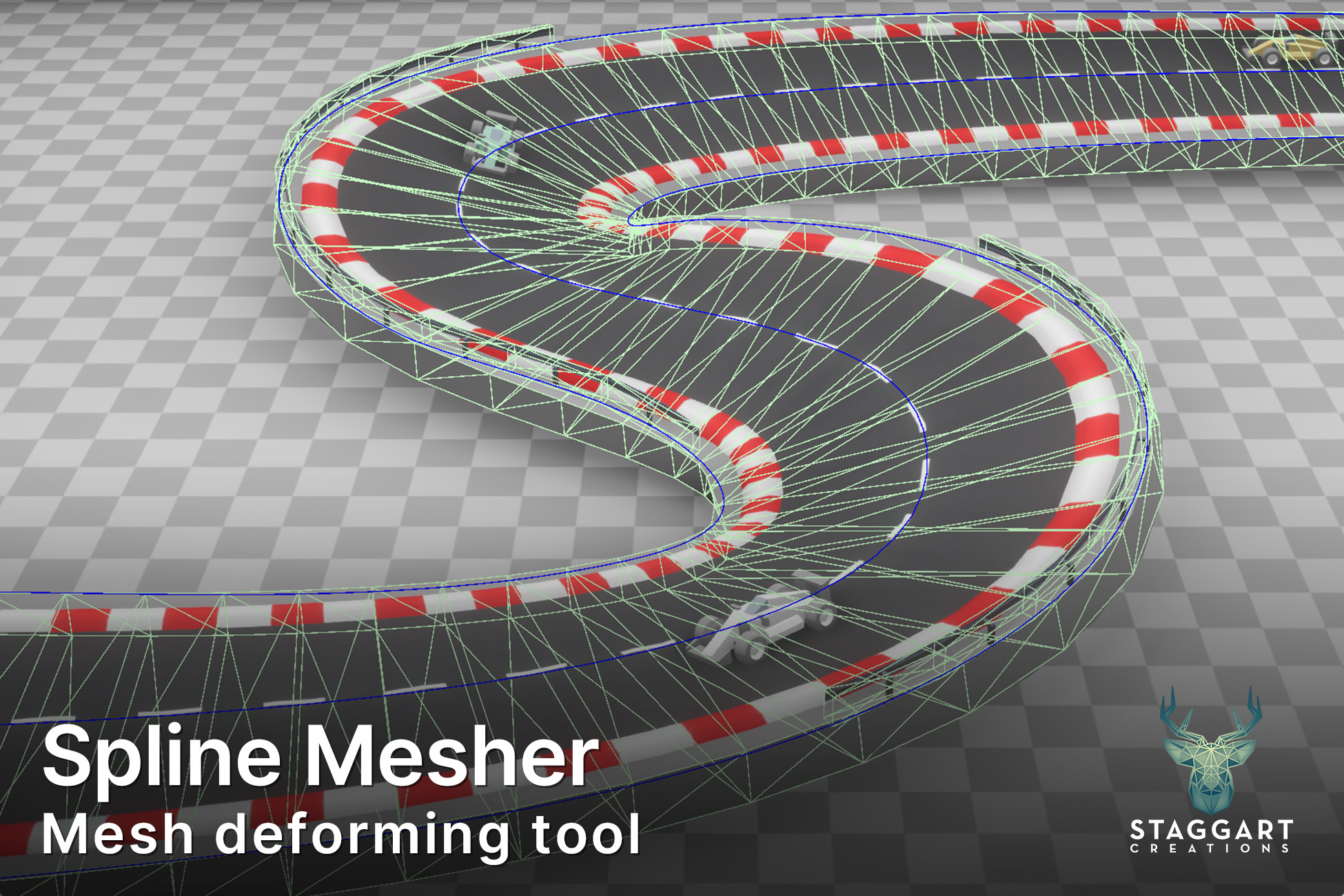
    « Requires Unity 2022.3 or newer . Supports Unity 6 » 📄 Documentation | 🟣 Discord | 💬 Forum thread 🎁 20% discount for Spline Spawner users. ⭐️ Pro features • Multithreaded mesh generation. ∟ Realtime changes within milliseconds, up to 50x faster! • Spline fill mesh generation ∟ Build lakes, curbs, islands, platforms and more. • Output mesh splits up into segments ∟ Optimal culling & rendering performance at large scales. • Procedural meshes as input or collider ∟ Configurable Cube, Cylinder or Plane input mesh. • MeshLOD support ∟ Generate LODs in the editor (Unity 6.2+) • Expanded collider functionality ∟ Convex and Kinematic collider support + collision/trigger events For a complete overview see the comparison table . 👍 A migration wizard is included to convert Spline Mesher Standard instances & prefabs. ❓What is Spline Mesher? A straightforward and powerful toolkit for spline-based mesh curving and generation. Essential for 3D world building. Built around Unity's native spline tool , making it intuitive to combine with other tools or gameplay logic. Designed for professionals; easy to use by anyone. 💠 Provide the Curve Mesher component with a spline and an input mesh , and it gets continuously repeated and deformed along its curves. 💠 Use the Fill Mesher component to create a mesh from a spline's contour with a uniform topology and distance field baked right into the UV. 🪄 This tool makes it easy to achieve these complex tasks right inside Unity, without needing to go back and forth between editor and external modeling software. Includes advanced features like vertex color control (for shaders), prefab end caps, snapping to colliders, and multi-material support. All in a clean, intuitive interface. Build fences, pipes, paths, cables and much more! 📌 Curve Mesh Features • Use a procedural Cube, Cylinder or Plane input mesh. Or any custom mesh • Automatic box/tube/plane/custom collider generation • Snapping/conforming to colliders • UV scale, offset, rotation and stretch control • Start & end prefab attachments • Rotation roll angle with per-point adjustments, twist a mesh around the spline • Vertex color data over the spline, to drive shader-based effects 📌 Fill Mesh Features • Uniform topology made out of equilateral triangles • Margin parameter, expand or contract the shape from the curve • Snapping vertices to linear knots, ensures precise shapes • Not completely limited to a flat mesh, edges follow the spline curvature • Displacement effects: buldging and noise-based • UV scale, offset, flipping, rotation and fitting • Distance to spline (SDF) baked into UV.z and Vertex Colors. ⚙️ Technical Features • Recalculated normals/tangents, ensuring correct lighting and shading • Rebuild/Collision/Trigger events exposed in the inspector, and through C# (run custom code before/after the mesh updates, or with collisions) • Lightmap UV generation • MeshLOD generation (Unity 6.2+ editor only) • Optimized vertex data, resulting in 50% smaller file sizes than traditionally generated meshes. • Option to use 16-bit precision (project-wide) when a smaller memory footprint is desired (~20%), at the risk of slight distortions in large meshes (+100m) Features a cleanly designed inspector UI, with tooltips and undo/redo support. Public C# functions are commented. ✔️ Supports • Runtime generation - just modify the spline, no extra code besides yours! • Multiple materials (aka sub-meshes) • Multiple splines within the same container • Negative scaling (eg. guardrails mirrored on either side of a track) • Baked lighting, including through Bakery • Auto rebuilding when the input mesh file changes (editor only) ⚡ Performance Expertly crafted for best CPU performance. • Uses cached spline data for 26 times faster spline sampling. • Mesh segments are processed in parallel on all cores. • Accellerated by Jobs & Burst and uses the low-level MeshData API. 👉 Changes are smooth and responsive. 🚧 Limitations: • The Fill Mesher functionality is not designed for 2D applications. • Usage of created meshes in runtime/editor loaded prefabs requires regenerating them on load (option available). Because Unity strictly saves procedural meshes in the scene file. Alternatively, they can be exported to an FBX file using the Unity's "FBX Exporter" package. 🎁 See also the Spline Spawner asset, a 20% discount is available if you own a Spline Mesher Standard/Pro license. Upgrade discounts from the Standard edition: • Until September 1st -> 40% • After that -> 30% 📢 Get free preview access to the upcoming Spline Extensions asset, the ultimate spline companion toolkit! Verify your invoice on Discord to join the beta.

    • modeling
    • Tools
  • River Modeler for Stylized Water 3 (Extension)

    By Staggart Creations

    Version 1.0.0

    Get the River Modeler for Stylized Water 3 (Extension) package from Staggart Creations and speed up your game development process.

    • level design
    • Tools
  • Stylized Grass Shader (for Unity 6)

    By Staggart Creations

    Version 2.1.0

    Add depth to your next project with Stylized Grass Shader (for Unity 6) from Staggart Creations. Find this & more VFX Shaders on the Unity Asset Store.

    • shaders
    • VFX
  • Stylized Water 2

    By Staggart Creations

    Version 1.7.1

    Add depth to your next project with Stylized Water 2 from Staggart Creations. Find this & more VFX Shaders on the Unity Asset Store.

    • shaders
    • VFX

Related Tools assets

  • FSR 4 Redstone - Upscaling for Unity

    By The Naked Dev

    Version 1.1.8

    Use the FSR 4 Redstone - Upscaling for Unity from The Naked Dev on your next project. Find this utility tool & more on the Unity Asset Store.

    • Tools
    • utilities
  • Amplify Impostors

    By Amplify Creations

    Version 1.1.0

    Use the Amplify Impostors from Amplify Creations on your next project. Find this utility tool & more on the Unity Asset Store.

    • Tools
    • utilities
  • Ultimate Preview – Animator Add-on

    By Voxel Labs

    Version 2.1.0

    Use the Ultimate Preview – Animator Add-on from Voxel Labs on your next project. Find this utility tool & more on the Unity Asset Store.

    • Tools
    • utilities
  • ScriptableObjects Tools

    By Ciro Continisio

    Version 2.1.0

    Use the ScriptableObjects Tools from Ciro Continisio on your next project. Find this utility tool & more on the Unity Asset Store.

    • Tools
    • utilities
  • Dialogue System for Unity

    By Pixel Crushers

    Version 2.2.75.3

    Get the Dialogue System for Unity package from Pixel Crushers and speed up your game development process.

    • behavior ai
    • Tools
  • GPU Instancer Pro - Crowd Animations

    By GurBu Technologies

    Version 0.10.7

    Use the GPU Instancer Pro - Crowd Animations tool from GurBu Technologies on your next project. Find this & more animation tools on the Unity Asset Store.

    • animation
    • Tools