Game PackageGame PackageGAME PACKAGE™
SubscriptionsLeaderboardAssets
Game PackageGame PackageGame Package

Unity assets, ready-made projects, and subscriptions in one storefront.

Explore

  • Subscriptions
  • Leaderboard
  • Assets
  • Ready-made
  • Search
© 2026 Game Package. All rights reserved.gamepackage.net
Opening asset
VariaBULLET2D Projectile & Bullet Hell System

By Unknown author

VariaBULLET2D Projectile & Bullet Hell System

VariaBULLET2D is a complete 2D projectile system for Unity!

Likes

42

Updated

05/15/2026

Main version

v1.06

Add version

Published

May 15, 2026

Category channels

Game Toolkits

Available builds

v1.06

External links

neondagger.com

Asset description

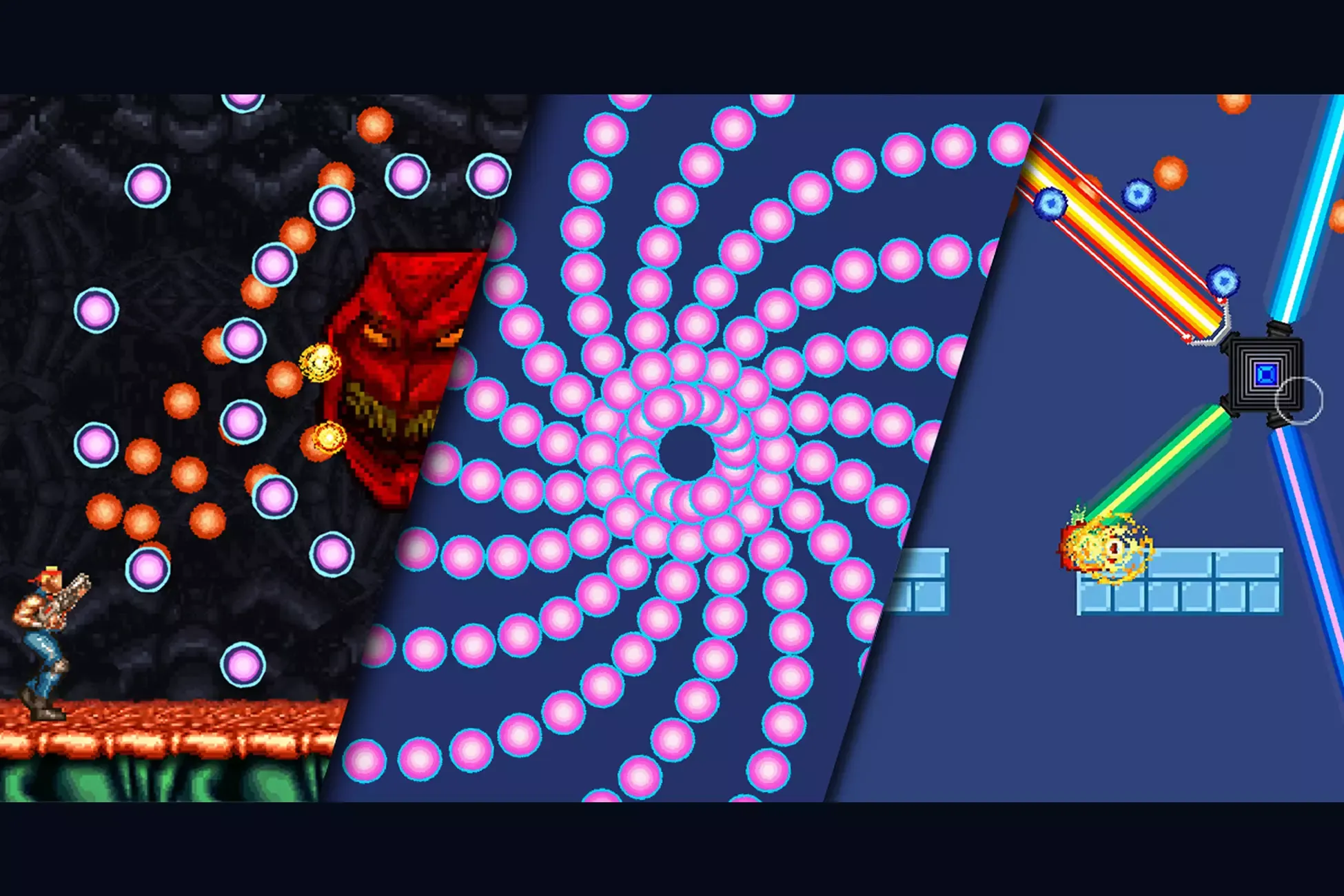
VariaBULLET2D is a complete 2D projectile system for Unity!

It's built to be extremely flexible, intuitive and simple to use whether when visually constructing emitter patterns in the editor or when extending the code to create your own unique shot types. -----------------------------------------------

The system is easily integrated with existing projects or you can use any of the 65+ included scenes as a foundation for a new one, complete with character controllers, collision management scripts for dealing damage, destroying objects and instantiating explosions... and a lot more!

SUPPORTED GAME TYPES: All game types and orientations are supported: vertical, horizontal, omni-directional, bullethell, sidescrolling, top-down, puzzle, physics, non-physics... basically any 2D style game that requires projectiles!

ONE SYSTEM. ENDLESS USES: The system is precisely the same whether constructing relatively simple player, enemy or weapon shot patterns or wild & complex clusters which fill the screen.

THE UNITY YOU KNOW AND LOVE: VariaBULLET2D was 100% constructed natively using Unity's built-in method and component system that you already understand. No messing around with a whole different set of scripting procedures, languages or hidden code!

NO SCRIPTING REQUIRED: Great care was taken to not only make VariaBULLET2D extremely simple to understand and extend with your own behaviors, but to also allow a great deal of behaviour to be determined visually, directly within the editor!

HIGHLY EFFICIENT: Since the underlying behaviors are completely written in Unity, there is no added overhead and with the added efficiency of optional object pooling you can get thousands of concurrent bullets without sacrificing FPS. ----------------------------------------------- NEW IN v1.06: · Optimizations for "Pixel Perfect" game style · Revamped automators, for creating dynamic emitter sequences · Bullet scaling effects

NEW IN v1.05: · Draw motion curves + easing for more flexible & dynamic emitter movement automation

NEW IN v1.04: · Massive Shmup-style Super Lasers!

NEW IN v1.03: · Dynamic colliders (1000's more bullets!) · Persistent shot "banking" object pooling option · Individual emitter pitch controls · Turret follower demo script + scene · Master controller setting for firing nested emitters

NEW IN v1.02: · Bubble & Flame thrower type weapons · Dynamic shot colorization options · Randomized automator option · Better support for efficient sprite-based particle FX

KEY FEATURES: · Set emitters visually in the editor

  • · Nest and automate emitter groups
  • · Omni-directional firing
  • · Stepped and linear emitter automators

· Simple shot animation frames and rotations · Over 20 different built-in shot behaviors · Simple and efficient one-click object pooling

  • · Custom firing point indicators
  • · Physics and Non-physics shots
  • · Highly extensible shot behaviour system

· Individual emitter level controls (rate, sprite, color, speed, etc) · Timer and emitter-death event system · Storable presets and realtime preset switching · Slowdown and CPU throttling emulation · Flexible collision and explosion system · Potentially 1000's of bullets at 60FPS

  • · Simple audio event system
  • · Fast emitter cloning workflow
  • · Shot parenting and release events

· Over 400 Sprite and Audio Assets · Extensive documentation -----------------------------------------------

Over 65 Included Demo Projects:

  • · 30+ Bullet Hell pattern examples
  • · Side-Scrolling Run n' Gun
  • · Horizontal Shooter
  • · Vertical Shooter
  • · Top-Down Inertial Shooter
  • · Puzzle Shooter
  • · Physics Destruction

· And Lots More! -----------------------------------------------

Over 20 Included Shot Behaviours:

· Linear (Physics/Non-Physics)
· Accelerating (Linear/Exponential)
· SpeedWave
· Bouncing (Physics)
· Gravitational (Physics)
· Homing (Non-Physics/Inertial)
· Re-Angle
· Boomerang
· Flame Thrower
· Super Laser
· Laser Beam
· Laser Packet
· Bullet With Emitters
· Exploding Bullets

· Easily Extend To Create Your Own!

For extensive documentation, guides and help go to:
Package overview

VariaBULLET2D Projectile & Bullet Hell System by Unknown author is a Unity asset listed on Game Package. Its catalog categories are Game Toolkits.

Requirements and compatibility

No render pipeline compatibility is specified for the published builds on this page.

Check the package description and the original listing for minimum editor versions, dependencies and import instructions before adding the asset to an existing project. View the Unity Asset Store listing.

Versions on Game Package

The current version listed here is 1.06.

  • v1.06
VariaBULLET2D Projectile & Bullet Hell System

VariaBULLET2D Projectile & Bullet Hell System

v1.0600123456789

05/15/2026

Price

25pts
Sign in
Open inUnity Store

More assets by Unknown author

  • Eadon Advanced Crafting

    By Unknown author

    Version 2.2

    Use the Eadon Advanced Crafting from Cogs & Goggles on your next project. Find this utility tool & more on the Unity Asset Store.

    • Tools
    • utilities
  • Eadon Survival for Invector TPC

    By Unknown author

    Version 2.1

    Get the Eadon Survival for Invector TPC package from Cogs & Goggles and speed up your game development process.

    • game toolkits
    • Tools
  • POLYGON - Dwarven Dungeon Map by Synty

    By Unknown author

    Version 1.0.2

    • 3D
    • dungeons
    • environments
  • Best TLS Security

    By Unknown author

    Version 3.1.0

    Best TLS Security for Unity: Secure, Comprehensive, and Essential Dive into a new realm of security with the Best TLS Security asset for Best HTTP. Crafted to offer an unparalleled layer of protection for your projects, this asset ensures that your Unity applications maintain the highest standards of encrypted communication when using Best HTTP and all packages built on top of it. With its myriad features and functions, this asset is the ultimate tool to fortify your projects against potential threats in the digital landscape. 💥 Website 💥 Docs 💥 Changelog 💥 Support Key Features: Unity Compatibility: Compatible with Unity versions starting from 2021.1 onwards. Platform Support: Whether you're targeting desktop, mobile, or web platforms, Best WebSockets has got you covered. Experience consistent performance across all major platforms supported by Unity: 💻 Desktop Platforms: Windows, Linux, MacOS. 📱 Mobile Platforms: iOS, Android. Additional Support: Universal Windows Platform (UWP). Seamless Integration: With just one line of code, secure the communication of your Best HTTP or any other Best package. Certificate Chain Verification: Conforming to RFC 3280, Best TLS Security provides meticulous certificate chain verification, ensuring the legitimacy of each certificate in the chain. 🔥Revocation Checking: Elevate your security by validating the authenticity of leaf certificates using OCSP. Choose between soft and hard fail options to suit your application's needs. OCSP Response Management: Efficiently manage and cache OCSP responses. With support for OCSP Must-Staple, stay assured of the legitimacy of your certificates. 🔥Certification Manager Window: Navigate through an intuitive interface tailored to manage Trusted Root CA, Trusted Intermediate, and Client Credentials. This window empowers you to:Update all certificates from trusted sources. Seamlessly incorporate custom certificates. Purge non-essential certificates for a streamlined list. Domain Name Matching: Reinforce the authenticity of your connections by ensuring domain names are verified, mitigating potential man-in-the-middle attacks. Client Authentication: Introduce an extra layer of security by verifying the identity of clients, ensuring only authorized entities gain access. Versatile Configuration: With an abundance of options at your disposal, customize every aspect of the add-on to resonate with your specific requirements. 🔥Essential Dependency: Best WebSockets is built upon and necessarily requires the Best HTTP package. This foundational package not only provides the core mechanisms for the asset but also bestows its renowned reliability and top-tier performance. Before diving into Best WebSockets, ensure the Best HTTP dependency is correctly installed into your Unity project, guaranteeing a seamless and high-performance networking journey. Debugging and Logging: Comprehensive logs provide invaluable insights during development and debugging. Code Availability: Source code included for flexibility and customization. ❗📝 The Best TLS Security package does not function under WebGL. When deploying to this platform, the underlying browser handles communication responsibilities, ensuring established security protocols are adhered to. In the dynamic and ever-evolving world of digital communication, security remains paramount. The Best TLS Security asset empowers you to stand firm against the uncertainties of the online realm, ensuring your Unity projects are not just functional, but also fortified. Trust in the meticulous design and robust features of this asset to shield your applications, allowing you to focus on what you do best: creating outstanding digital experiences. With Best TLS Security, you're not just coding; you're crafting with confidence.

    • Network
  • Best WebSockets

    By Unknown author

    Version 3.0.10

    Get the Best WebSockets package from Tivadar György Nagy and speed up your game development process.

    • network
    • Tools
  • SGSR 1 Mobile - Upscaling for Unity

    By Unknown author

    Version 1.4.5

    SGSR 1 Mobile - Upscaling for Unity has been tested in Unity versions 2019, 2020, 2021, 2022, 2023 and Unity 6 up to 6.3! ✅This asset will receive a minimum 2 years of support & free updates. ⚡Boost your frames with SGSR Mobile - Upscaling for Unity!⚡ SGSR is an upscaling technique specifically created for ultimate performance for mobile devices! It creates high quality and resolution frames based on lower resolution input. By using this, your project can run in a drastically lower resolution without losing visual quality and increasing the framerate! This Unity asset is created to interface with Qualcomm's Snapdragon Game Super Resolution found here: https://github.com/quic/snapdragon-gsr. If your project is limited by GPU performance, SGSR Mobile will give you a higher framerate. If a project is limited by CPU performance, all it will do is make the GPU workload lower. While this may seem like a big limitation, it also means a mobile device will use way less battery power when using SGSR! 🌀Easy to use SGSR has been designed for an easy setup, with an extensive documentation describing the process. Additionally, SGSR has been extensively tested with all default Unity Post-Processing, however we can't guarentee that all custom Post-Processing assets will work out of the box. If you run into problems with custom assets, contact us and we'll see if we can help to add support for it! ❤️Boost further with the Ultimate Upscaler Bundle Are you looking for the absolute best quality upscaling? Enhance your project's visual fidelity by also adding our other upscalers to your project with our Ultimate Upscaler Bundle! 🆓 Not convinced? Try our free evaluation version. Experience the full feature set of our premium upscalers, restricted to Windows builds and watermarked for evaluation purposes. Download it here. 🛟Support If you run across any issue with implementing SGSR, please read our Documentation or contact us on Discord. Even while the asset has been rigorously tested, there are always edge cases that are difficult to foresee, please contact us if you run into any issue! 👷Third Party Integrations / Connections These assets have added specific support for this asset. Please note that these assets are not included! If you need support for these assets, please contact the original developer. Unified Settings & Game Options UI - A settings template with one unified interface for all render pipelines (URP, HDRP, Built-in) and input systems (old and new). Settings Menu Creator - Build customized settings menus in no time. Works in Built-in, URP, and HDRP. The integration works with all versions including the Free one. HTrace Ambient Occlusion three of the most popular ambient occlusion techniques into a single asset, offering a highly scalable and adaptive system for AO computation. Need integration with another asset? Please send the request to info@thenakeddev.com. Asset uses Snapdragon™ Game Super Resolution under the BSD 3-clause “New” or “Revised” License; see Third-Party Notices.txt file in package for details. ⭐⭐⭐⭐⭐ "One of the best assets on the Unity Asset Store made by one of the best asset developers." Todd D'Arcy - Managing Director [Falling Frontier] ⭐⭐⭐⭐⭐ "Saved our console release, 5 stars! Hard-working, passionate, attentive and responsive. It's been nothing but a pleasure working with Dominic and his team." Andrew 'Refleax' Farrugia - CEO & Game Director [Holdfast] ⭐⭐⭐⭐⭐ "The best way to get upscaling for Unity! Really improved performance and visual fidelity with ease. Combine that with very dedicated developers and you got a top tier asset!" Roan Albers - Art Lead [Descenders Next]

    • Utilities

Related Game Toolkits assets

  • Realistic Sniper and Ballistics

    By Unknown author

    Version 1.2

    Description Realistic Sniper and Ballistics System (RSB) is a toolset to create any type of shooter game—specifically a sniper game—that includes realistic ballistics simulation. Create realistic bullet/ballistic trajectories, bullet time effects, dynamic scope systems, penetration & ricochet and much more, right out of the box. RSB is not a template for a single genre, it can be used in first-person, third-person or any kind of game that requires realistic bullet simulation. That being said, RSB also provides you with game-ready first-person controller with headbob, gunsway, holding breath sway as well as a simple bolt-action weapon controller. Almost all the systems in RSB are decoupled from each other, with an event system that makes it possible to integrate RSB into your own projects and only use those parts that are really needed! Thus, RSB can easily be used with your already existing players or other shooter assets. Get Started | Documentation | Support Discord | Contact | Twitter | Windows Demo

    • Game Toolkits
  • Inventory Plus Inventory System

    By Unknown author

    Version 2.0.1

    What is it? InventoryPlus is an intuitive and powerful tool that simplifies the creation of custom inventories, chests and pickups. The asset is designed primarely for mouse and keyboard but supports gamepads as well. InventoryPlus takes care for you of all the inventory operations you can think of (like use, equip, sort, drop etc...) It works on 3D, 2.5D and 2D games by tweaking the collider type of TriggerAreas, PickUp and Chests How do I use it? Simple: install the package, drag the inventory prefab in your scene and tweak the InventoryPlus component to fit your need, there are no additional packages required! The package accommodates the user who wants a simple plug and play solution and also developers who want to add their own modifications on top of the existing code. The resolution used for the UI in the sample scene is 16:9. What's included? The package contains: Item Type Scriptable Objects Inventory prefab + script Chest prefab + script Player controller with an animated sprite PickUp prefab with an animated sprite AreaTrigger prefab with an animated sprite Multiple inventory UI slots Prefab folder with all the "core" components 2 sample scenes that guide you and allow you to experiment with the asset The package main features are: Togglable inventory with a customizable hotbar Enables you to create new Item Types using Scripable Objects Allows you to create a custom visual for your inventory Stores both stackable and non-stackable items in the inventory and chests Displays durability of items with a progression bar and/or value (customizable) Changes the visual of items based on their durability Allows you to dedicate specific inventory slots to specific items categories Use items when the inventory is openend and/or closed (customizable) Drop items when the inventory is openend and/or closed (customizable) Equip items when the inventory is openend and/or closed (customizable) Sort items when the inventory is openend and/or closed (customizable) Swap items when the inventory is openend and/or closed (customizable). The operation can also be performed also with the mouse if the option is enabled Contains an InputReader to trigger inventory events Allows you to pickup items when dropped from the inventory Allows you to perform operation on inventory items based on their category or ID Top-down character controller Allows you to interact with chests Allows you to save the player inventory when moving through scenes Allows you to save pickups and chest so that they can be loaded when the scene is launched again ▒▒▒▒▒▒▒▒▒▒▒▒▒▒▒▒▒▒▒▒▒▒▒▒▒▒ » FAQ: Does the Inventory Tool support multiplayer games? Absolutely! InventoryPlus is designed to work flawlessly with both single-player and multiplayer games in Unity. Do I need to be a coder? No, the asset allows you to simply edit the inventory to your need (check the documentation below to know the details). If you want to add new features a intermediate level of programming is required and of course I'm always available to assist you via email. Does the Inventory Tool support item stacking and sorting? Yes, InventoryPlus offers robust support for item stacking and sorting, making it easy to manage and organize large quantities of items within the inventory system. Is the Inventory Tool compatible with mobile platforms? Of course, the asset is designed to be compatible with mobile platforms in Unity, allowing you to create custom inventories for your mobile games with ease. ____________________________________ If you have any questions, suggestions or feedback, please feel free to contact me at nappin.1bit@gmail.com [Documentation / Walkthrough] [Support Thread] [Twitter]

    • Game Toolkits
  • Skills for Game Creator 1

    By Unknown author

    Version 1.0.9

    Skills for Game Creator gives you the ability to add a skill system to your game. Notice: This module requires Game Creator and the Stats module and won’t work without them. 💠 FEATURES 💠 Skills Unlock them, check for a condition, define what it does and how it looks, you have full flexibility. Skill Trees Offers two unique methods to work in your game! Automatic Generation is an easy to use system which can build the skill tree for you! There is less customization but super easy to use If your prefer more customization then you can you use the included manual prefab where you can make it exactly like you want. Note: There are some limitations on the automatic one, make sure to check the documentation! Skill Bar Use the skill bar to quickly add unlocked skills to the skill bar or remove them from there. When using this feature, you can set the key code for the system to listen for this slot and execute the skill that it has assigned. Actions/Conditions/Triggers With this module, you get many actions, conditions and triggers in order to customize how the system reacts to certain events. Source Code You get the full source code, nothing compiled to DLL. Add additional functionality or change the behavior, you can do it! Check out the WebGL demo! Note: In order to play the demo in the Unity Editor, you need to download these two free mixamo animation assets: Magic Pack Melee Axe Pack 💠 LINKS 💠 Documentation Discord Twitter

    • Game Toolkits