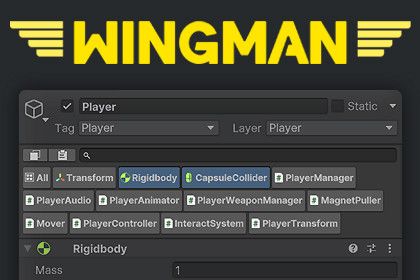
Component Isolation
Quickly isolate individual components to avoid endless scrolling. Focus on just the components relevant to your task by using Ctrl and Shift to select and isolate multiple items, streamlining your workflow.
Search
Find fields across all components with smart pattern matching, eliminating the need for exact matches.
Copy & Paste
Quickly copy single or multiple components, paste them repeatedly as needed, and enjoy full undo support for every action.
Flexible Selection
Select, isolate, or copy multiple components using Ctrl to add individuals and Shift to select ranges within the current selection.
Drag & Drop
Drag the selected components to the hierarchy window to create a new GameObject from them or copy them to an existing one.
Context Menu
Right-click to open a context menu and quickly perform actions on components without scrolling to find them.
Settings Menu
Easily customize the look and behavior to better suit your workflow and preferences.
Persistent Data
Preserves component selection and search results, allowing you to inspect other objects without losing your place.
Using Custom Inspectors?
Your custom inspectors will maintain their look and feel. However, fields appearing in search results will be drawn using Unity’s default GUI, which may alter their appearance.
Compatibility
Compatible with other inspector assets, with full testing done on vInspector 2.
Supported Unity Versions
Unity 2021 and above.
Sign in to offer a newer .unitypackage for this asset. Uploads are reviewed before they appear.

Wingman - Your Inspector’s Best Friend
Sign in to add this asset to your library.