Overview
In Unity every now and then you have to switch back and forth between assets in order to configure them interdependently. Be it because of texture assignment, material assignment, you name it. With 2 assets you can help yourself with 2 inspectors and locking one. However that's already very tedious, limiting and will get you only so far. Another thing is that you occasionally want to switch back and forth in history. Just like it's common in modern browsers. The Unity Editor doesn't have that feature yet. Besides Unity's own internal favorites mechanism is very limited as well.
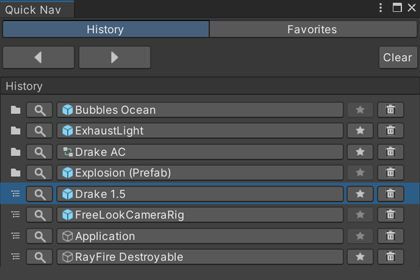
So I created this tool to see the navigation history and in addition to that store history items or currently selected items in a favorites list.
Free vs Support Edition
The Free and the Support Edition are identical. I just enjoy coding and creating tools and provide my workflow for the awesome Unity Community. The Support Edition is available in case you find the asset useful for your workflow and you would like to support the developer.
Editions
Features
Among the features of this asset are:
- Navigation History
- Favorites List
- Ping items, i. e. select them
- Inspect items, i. e. select them and open them in the Inspector
- Add history items to favorites
- Add current selection to favorites
- Support Project and Scene
- Favorites list is Reorderable
- Open Files (Scene, C#, Images)
- Separators
- Drag & Drop multiple to Favorites
Bundle Option
You can get this asset also as part of this Bundle:
Links
Sign in to offer a newer .unitypackage for this asset. Uploads are reviewed before they appear.


QuickNav - History's Favorites - Support Edition
Sign in to add this asset to your library.