Overview
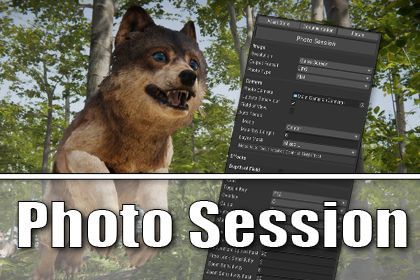
Photo Session allows you to pause the game, move around with the camera and capture screenshots. It works in the Editor's Play mode and in the Build. It allows you to create awesome looking screenshots and give focus to your asset. Extremely useful for capturing exciting moments and to create media for advertising.
Features
Among the various features of Photo Session are:
- Photo Mode during gameplay
- Hotkey for entering and exiting Photo Mode
- Capture higher than native resolution screenshots
- Various image file formats
- Flat 2d image capture
- 360 degree capture
- Camera adjustments during Photo Mode (eg Field of View)
- Manual and Auto Focus for Depth of Field effect
- Overlay with statistics
- Composition Guides (eg Rule of Thirds, Fibonacci)
- Customizable navigation speeds
- Variable time scale (continue game in slow motion during capture)
- Register camera positions and jump there
- Auto Setup
- Source code available
- Instant preview in editor
Please take a look at the screenshots and videos to get an idea how Photo Session can be used.
The Idea
Malbers released his awesome Realistic Wolves and I wanted to capture their details with close up screenshots of those beautiful furry models and give focus to them.
So one of the primary goals is to allow publishers to create awesome screenshots for the advertising of their assets.
Requirements & Limitations
The functionality depends on the Time class of Unity and what it provides for pausing a game. It works with Unity's own feature set and what setting the game time to 0 or a variable value implies.
Photo Session works in all render pipelines. However the output image very much depends on the state of the respective Unity and render pipeline versions.
Showcase Videos
The videos are examples of what you can do with Photo Session in combination with other assets. In case you are interested the descriptions of the videos contain information about which assets were used.
Links
Media
The logos were created using Photo Session and these highly recommended assets:
Sign in to offer a newer .unitypackage for this asset. Uploads are reviewed before they appear.

Photo Session
Sign in to add this asset to your library.