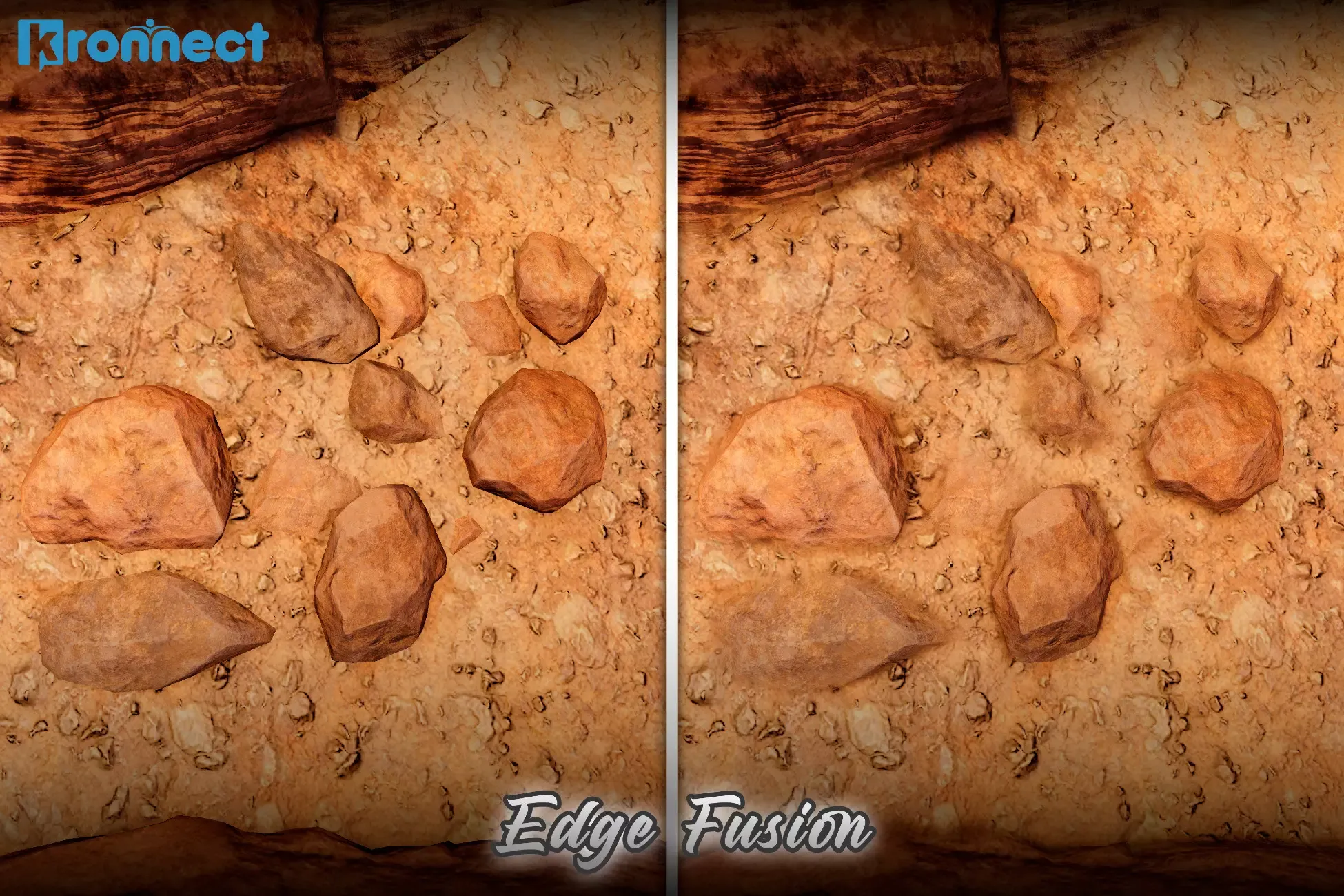
Edge Fusion is a post-processing effect for Universal Render Pipeline that blends edges between objects to eliminate hard seams and produce cohesive, natural-looking scenes. Add it as a Render Feature and control it through a Volume, with both global and per-object settings to target exactly where blending should occur.
🌟 Key features:
-
Edge blending: smooths transitions between meshes, terrain, and props without changing materials or geometry.
-
Global control via Volume: intensity, world‑space radius, max blend distance, and max screen radius.
-
Intra-object fusion (optional): blends within the same mesh based on normal/depth discontinuities.
-
Per-object overrides with Edge Fusion Object: custom radius (0 disables), include children with layer mask.
-
Performance tuning: sample count, binary search steps, jitter (TAA-friendly), 3D noise (intensity/scale), shadow protection.
-
Blend layers: choose precisely which objects participate in blending, including exclusion rules.
-
Debug views: object IDs, Edges, Blending, Normals, and Depth.
-
Compare mode: realtime side-by-side view to compare the original with the applied effect.
-
Editor friendly: optional Scene View rendering; can run even if the camera’s post processing is off.
🎯 Ideal usecases:
Modular environments: hide seams between tiles, walls, floors, cliffs. Terrain + props/materials: blend contacts for rocks, sand, snow, mud, gravel, dust, ice, ash, soil, moss, roots, asphalt/roads, ... Kitbashing/mixed packs: unify assets from different styles and PBR setups. Photogrammetry: soften scan boundaries when merging with terrain/meshes. Foliage/debris contacts: reduce harsh intersections for more believable placement. Intra‑object smoothing: reduce visible splits/normal seams on segmented meshes. Cinematics/marketing: fast polish without editing materials or geometry. Prototyping/blockouts: Instant cohesion while iterating layouts.
➡️ Getting started:
-
Add the Edge Fusion Render Feature to your URP Renderer.
-
Create a Global Volume (or use an existing one) and add “Kronnect/Edge Fusion”.
-
Adjust intensity and radius; set your blend layers.
-
Optionally add Edge Fusion Object to specific GameObjects for fine control.
Related assets:
Edge Fusion is included in our Visual Fidelity Ultra and Ultimate Bundle. You can buy Edge Fusion now and upgrade later to any of these bundles with a discount.
- Looking for HDRP support? Check out Edge Fusion HDRP.
📖 Documentation | 💬 Support | 🎬 YouTube | 🏢 Publisher Page
Kronnect is dedicated to high-quality Unity assets with continuous updates and responsive support.
Sign in to offer a newer .unitypackage for this asset. Uploads are reviewed before they appear.
![Analytical Volumetric Lighting [URP] - Performant Raytraced Volumetric Lights](https://gamepackage.net/media/rapiga-files/uploads/analytical_volumetric_lighting_urp_performant_raytraced_volumetric_lights_5445fd3701.jpg)